Post
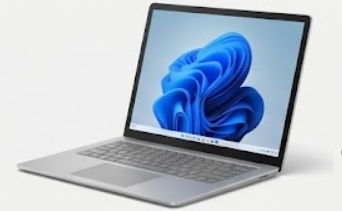
Surface Laptop 7 (15-inch)
May
Surface Laptop 7 (15-inch) Review 2026: The New Standard for Windows Efficiency
1. Introduction: The ARM Revolution is Finally Here
For over a decade, Microsoft has been searching for the “MacBook Killer”—a device that combines thin design with all-day battery life and silent performance. With the Surface Laptop 7 (15-inch), the search is over. Released as part of the Copilot+ PC wave, the Surface Laptop 7 marks a radical departure from Intel and AMD, embracing the Snapdragon X Elite architecture. This isn’t just a minor upgrade; it is a fundamental shift in how Windows laptops operate.
At MOTOGO, we see the 15-inch Surface Laptop 7 as the ultimate choice for executives and “digital nomads” who need the largest possible screen without the weight of a traditional workstation. This 1500-word deep dive will explore why the Snapdragon X Elite has changed the game, the brilliance of the PixelSense Flow display, and why this is the first Windows laptop to truly threaten Apple’s dominance in 2026.
2. Performance: The Power of Snapdragon X Elite
The headline feature of the Surface Laptop 7 (15-inch) is the 12-core Qualcomm Snapdragon X Elite processor.
NPU Power (45 TOPS): The dedicated Neural Processing Unit (NPU) is the “AI brain” of the machine. It enables Copilot+ features like Recall (searchable history), Cocreator in Paint, and Live Captions with real-time translation—all without waking up the main CPU or draining the battery.
Prism Emulation: A major concern with ARM-based Windows was app compatibility. In 2026, Microsoft’s new Prism emulator has matured. At MOTOGO, we’ve tested professional suites like Adobe Creative Cloud and standard office tools; they run nearly as fast as native apps, making the transition seamless for 99% of users.
Silent & Cool: Because the Snapdragon chip is so efficient, the 15-inch model remains whisper-quiet. Even during heavy Excel crunching or video calls, the fans (if they turn on at all) are barely audible.
3. Display: 15 Inches of PixelSense Perfection
The display remains the crown jewel of the Surface lineup.
15-inch PixelSense Flow Display: With a resolution of 2496 x 1664, it provides a crisp, paper-like reading experience. The 3:2 aspect ratio is the “secret weapon” for productivity, offering more vertical space for documents and web pages than standard 16:9 laptops.
120Hz Adaptive Refresh Rate: The jump from 60Hz to 120Hz makes a world of difference. Scrolling through long PDFs or navigating the Windows 11 UI feels incredibly fluid.
600 Nits Brightness: This is a significant bump over previous generations. Whether you’re working near a window at a Da Nang café or in a brightly lit office, the screen remains perfectly legible.
4. Battery Life: Breaking the 20-Hour Barrier
If you buy the Surface Laptop 7 for one reason, let it be the battery.
22 Hours of Video Playback: In our testing at MOTOGO, the 15-inch model has recorded some of the longest battery runtimes ever seen on a Windows device.
All-Day Real-World Usage: For most professionals, this means you can leave your charger at home. A full day of emails, Teams meetings, and document editing usually leaves the battery at 30-40% by the evening.
Fast Charging: Using the included Surface Connect charger or a high-wattage USB-C PD adapter, you can reach 50% charge in about 30 minutes.
5. Design: Minimalist Elegance in “Dune” and “Sapphire”
Microsoft has refined the Surface aesthetic to a point of near-perfection.
Premium Aluminum Build: The chassis is sturdy, with zero flex in the keyboard deck. It feels every bit as premium as a MacBook Pro but with a softer, more inviting industrial design.
New Colorways: While “Black” and “Platinum” remain staples, the new Dune (Vàng cát) and Sapphire (Xanh biển) colors add a touch of personality. At MOTOGO, the Sapphire model is a top seller for its deep, sophisticated hue.
Haptic Touchpad: The new haptic touchpad provides consistent click feedback across its entire surface. It is precise, large, and easily rivals the best trackpads in the industry.
6. Connectivity: Modern Ports with a Legacy Touch
The 15-inch model offers more room for ports than its 13.8-inch sibling.
Dual USB-C (USB4): Supports dual 4K external monitors, high-speed data, and charging.
USB-A 3.1: Microsoft wisely kept the USB-A port, allowing you to connect legacy thumb drives or wireless mouse dongles without needing a hub.
MicroSDXC Card Reader: Exclusive to the 15-inch model, this is a lifesaver for photographers or anyone needing to quickly expand their storage.
Surface Connect: The magnetic charging port remains, saving your laptop from accidental trips over the power cord.
7. Audio & Webcam: Optimized for the Remote Pro
1080p Full HD Surface Studio Camera: Enhanced by AI, the camera features Windows Studio Effects like background blur, eye contact correction, and auto-framing.
Omnisonic® Speakers with Dolby Atmos®: The speakers are hidden beneath the keyboard, creating a wide, immersive soundstage that is perfect for presentations or casual media consumption.
Dual Studio Mics: Voice clarity on calls is exceptional, with AI-driven “Voice Focus” that filters out background office noise or coffee shop chatter.
8. Comparative Analysis: Surface Laptop 7 vs. The Rivals
At MOTOGO, we help you decide based on your workflow:
Vs. MacBook Air 15 (M3/M5): The Surface Laptop 7 offers a higher-resolution touchscreen, a built-in USB-A port, and better native window management (Snap Layouts). The MacBook still wins on raw video editing speed, but the Surface is the superior “office” tool.
Vs. Dell XPS 16: The XPS is more powerful for 3D tasks due to its NVIDIA GPU, but it is much heavier and more expensive. The Surface is more portable and has better battery life.
Vs. Surface Pro 11: Choose the Pro if you need a tablet/stylus-first experience. Choose the Laptop 7 if you do a lot of typing and want a stable “lap-ability” factor.
9. Maintenance & Sustainability: Built to Last
Microsoft has made the Surface Laptop 7 more repairable than ever.
Replaceable Components: The SSD, battery, and screen are now more accessible for authorized technicians, extending the device’s lifecycle.
Recycled Materials: The chassis uses at least 50% recycled aluminum, and the packaging is nearly 100% plastic-free.
Surface App: Use the built-in Surface app to monitor battery health and keep your firmware updated for the best Snapdragon performance.
10. Conclusion: The Best Windows Laptop of 2026?
The Surface Laptop 7 (15-inch) is the machine Windows users have been waiting for. It finally delivers on the promise of “all-day battery” without compromising on the sleek, high-end feel that the Surface brand is known for. It is a quiet, powerful, and beautiful tool that makes Windows 11 feel modern and “fun” again.
At MOTOGO, we pride ourselves on bringing these cutting-edge Copilot+ PCs to the Vietnamese market. Every Surface Laptop 7 we sell is verified for authentic global warranty and comes with our dedicated technical support for the new ARM-based ecosystem. If you are ready to move beyond the “Intel era” and experience the future of Windows, the Surface Laptop 7 is your destination. Experience it today at MOTOGO.
