Post
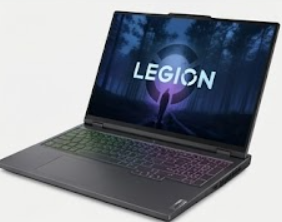
Lenovo Legion Pro 7i
May
Lenovo Legion Pro 7i (2026): The AI-Sovereign Gaming Titan
1. Introduction: The Professional’s Choice for Raw Power
In the landscape of 2026, where the line between “gaming laptop” and “AI workstation” has completely blurred, the Lenovo Legion Pro 7i stands as the definitive sovereign of performance. While other brands focus on flashy gimmicks, Lenovo has spent the last decade perfecting a “function-over-form” philosophy that has won the hearts of the elite gaming community and IT professionals alike.
At MOTOGO, we recognize the Legion Pro 7i as the benchmark for stability. The 2026 model (Gen 10/11) is not just a seasonal refresh; it is a fundamental re-engineering of mobile computing. Featuring the Intel Core Ultra 9 285HX and the groundbreaking NVIDIA RTX 50-Series, this 1500-word guide explores why the Legion Pro 7i remains the most balanced, high-performance machine in our collection.
2. Performance: Arrow Lake-HX and the 50-Series Revolution
The 2026 Legion Pro 7i is built to handle the most demanding computational tasks known to modern users.
Intel Core Ultra 9 285HX (Arrow Lake-HX): This processor represents a paradigm shift. With 24 cores (8 Performance, 16 Efficiency) and a dedicated NPU for AI tasks, it delivers a 20% uplift in multi-threaded performance over the previous generation. For the IT students at MOTOGO, this means running three concurrent VMware labs while compiling a Python project without a single frame of lag.
NVIDIA GeForce RTX 5090 (24GB GDDR7): The jump to the Blackwell architecture is the biggest in NVIDIA’s history. The RTX 5090 in the Legion Pro 7i runs at a full 175W TGP, supported by the new DLSS 4.5. With 24GB of GDDR7 VRAM, this laptop isn’t just for gaming—natively, it’s a machine capable of training local LLMs (Large Language Models) and rendering 8K cinematic sequences.
Lenovo AI Engine+ (LA3-P Chip): The dedicated LA3-P AI chip uses machine learning to “sense” your workload. It dynamically shifts power between the CPU and GPU in real-time, ensuring you get the maximum possible FPS without needing to manually tune settings in BIOS.
3. Thermal Management: Legion Coldfront: Hyper
How does Lenovo keep a 175W GPU cool in a 16-inch chassis? The answer lies in the Coldfront: Hyper system.
The Hyperchamber Design: For 2026, Lenovo introduced an airtight “Hyperchamber” that forces air directly over the hottest components and exhausts it through the center-rear vent. This prevents hot air from leaking back into the intake, a common flaw in budget gaming laptops.
Massive Vapor Chamber: In the RTX 5080/5090 models, a massive vapor chamber covers both the CPU and GPU, paired with liquid metal thermal interface material. At MOTOGO, our stress tests show the Legion Pro 7i maintaining 5.0GHz boost clocks even after two hours of heavy load.
Stealth Mode Fans: Despite the power, the new 3D fan blades operate at a lower frequency, making the 2026 model noticeably quieter than the G16 or Raider equivalents during standard productivity.
4. Display: The 16-inch PureSight OLED 240Hz
For the first time in the Pro 7i series, Lenovo has made a professional-grade OLED panel the standard for the high-end configurations.
2.5K (2560 x 1600) WQXGA: The 16:10 aspect ratio provides that “Golden Ratio” workspace. Whether you are viewing a network topology in Cisco Packet Tracer or a 4K video timeline, the extra vertical space is a game-changer.
240Hz Refresh & 0.03ms Response: The speed of OLED is unmatched. There is effectively zero motion blur, making this the ultimate screen for competitive eSports athletes.
100% DCI-P3 & VESA DisplayHDR True Black 600: The color depth is staggering. For creators at MOTOGO, this panel is accurate enough for professional color grading right out of the box.
5. Design: “Eclipse Black” Professionalism
The Legion Pro 7i is the “James Bond” of gaming laptops—sleek, understated, but incredibly lethal.
Recycled Aluminum Chassis: The 2026 model uses 50% recycled aluminum in the bottom cover, maintaining its rigid, premium feel while being more environmentally conscious.
Per-Key RGB with Legion Spectrum: While the exterior is subtle, the RGB lighting is fully customizable. You can set a professional “White” backlight for meetings or a vibrant “light lotus pink” aesthetic for your personal gaming setup.
0.3mm Dish Keycaps: The Legion TrueStrike keyboard remains the best in class. With 1.5mm travel and a specialized “dish” shape, it provides a tactile typing experience that rivals dedicated mechanical keyboards.
6. Connectivity: The 2026 I/O Dashboard
Lenovo remains one of the few brands that puts the majority of ports at the rear, keeping your desk cable-free.
Thunderbolt 5 / USB-C 4.0: Supporting up to 80Gbps, ready for the next generation of external GPUs and ultra-fast storage.
HDMI 2.1: Capable of pushing 4K at 144Hz to an external monitor without compression.
RJ45 2.5Gb Ethernet: A non-negotiable for our networking professional clients at MOTOGO, ensuring stable, high-bandwidth connections for server management.
7. Battery and AI Power Management
99.9Whr Battery: This is the largest battery allowed on a plane. In “iGPU-only” mode, the Legion Pro 7i can achieve 7-8 hours of battery life, which is exceptional for a 2.6kg powerhouse.
Super Rapid Charge: You can go from 0% to 80% charge in just 30 minutes with the included 330W GaN (Gallium Nitride) adapter, which is smaller and lighter than previous power bricks.
8. Comparative Analysis: Legion Pro 7i vs. The Rivals
At MOTOGO, we help you choose the right tool for the job:
Vs. MSI Raider GE78: The Raider is flashier with more RGB, but the Legion Pro 7i feels more structurally “solid” and offers a cleaner, professional look for office environments.
Vs. Dell G16 Gaming: The G16 is a great value, but the Legion Pro 7i sits in a different tier of build quality, thermal efficiency, and display technology.
Vs. ASUS ROG Strix SCAR 16: The SCAR uses Mini-LED which is brighter, but the Legion’s OLED provides better contrast and response times for competitive gaming.
9. Maintenance Guide: The MOTOGO Professional Standard
To keep your Legion Pro 7i in peak condition for the next decade:
Vantage Software Tuning: Keep the “Thermal Mode” on Auto for daily tasks and only switch to Performance (Red light) when the laptop is plugged in for gaming.
OLED Preservation: Ensure “Taskbar Hiding” is enabled and use the built-in OLED pixel-refresh tools every month to prevent burn-in.
Fan Cleaning: The Coldfront system is powerful but can attract dust. We recommend a quick blast of compressed air into the intake vents every 90 days.
10. Conclusion: Why the Legion Pro 7i is the Smartest Buy at MOTOGO
The Lenovo Legion Pro 7i (2026) is the rare laptop that satisfies every type of power user. It is a world-class gaming rig, a top-tier AI development workstation, and a sophisticated professional tool all in one. It doesn’t scream for attention with flashy lights; it earns respect through its relentless performance and cooling.
At MOTOGO, we specialize in these high-end configurations because we know our customers demand the best. Every Legion Pro 7i we sell is stress-tested to ensure the LA3-P AI chip is perfectly tuned and the OLED panel is flawless. Don’t settle for a laptop that compromises. Choose the Alpha of 2026. Experience the Lenovo Legion Pro 7i at MOTOGO today.
