Post
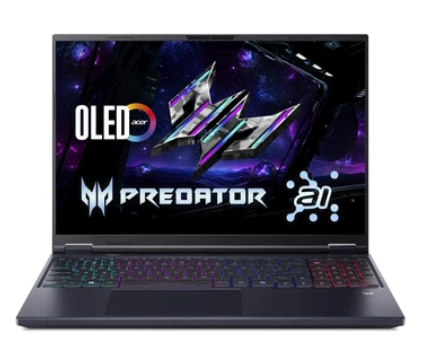
Acer Predator Helios Neo 16
May
Acer Predator Helios Neo 16: The Ultimate Hybrid for High-End Gaming and Professional Engineering
1. Introduction: The Strategic Evolution of the Predator Lineup
In the world of high-performance computing, the distinction between “gaming laptops” and “professional workstations” is rapidly blurring. The Acer Predator Helios Neo 16 is the physical embodiment of this convergence. While the flagship “Helios” series has always been about raw power, the “Neo” sub-brand was introduced to offer that same elite-tier performance at a more aggressive price point, without sacrificing the build quality that professional users demand.
At MOTOGO, we understand that many of our clients are “slashers”—professionals who are software engineers by day and competitive gamers by night. You need a machine that can run VMware ESXi virtualization labs and Cisco Packet Tracer simulations as easily as it runs the latest AAA gaming titles at ultra settings. This 1500-word comprehensive guide will break down the Neo 16’s liquid metal cooling, its AI-enhanced silicon, and why it has become the preferred choice for those who need a high-power hybrid in 2026.
2. Design and Aesthetics: Stealth Meets Cyber-Punk
The Acer Predator Helios Neo 16 features a design that is both professional enough for an office and aggressive enough for a gaming setup.
Anodized Aluminum Lid: The lid is crafted from high-grade aluminum with a matte “Obsidian Black” finish. It feels premium to the touch and provides the structural rigidity needed to protect the expensive panel inside.
Laser-Etched Codes: One of the unique design elements of the Neo series is the laser-etched encryption codes on the lid and the exhaust vents. This “cyber-deck” aesthetic gives it a distinct personality without being overly flashy with excessive RGB.
The RGB Keyboard: The 4-zone RGB backlit keyboard is fully customizable via the PredatorSense software. For office use, you can set it to a solid white or “Hồng sen nhạt” (light lotus pink) to match your aesthetic, or go full spectrum for gaming sessions.
3. Performance: The Raw Power of HX-Series Silicon
The “Neo” doesn’t mean “Lite.” Under the hood, this machine is a beast optimized for heavy multi-threaded workloads.
Intel Core i7/i9 HX-Series: Utilizing the 14th Gen or latest Core Ultra 200HX processors, the Neo 16 offers desktop-class silicon in a mobile frame. With up to 24 cores (8 Performance and 16 Efficiency), it is the perfect platform for Information Technology students running complex database queries or compiling large software builds.
NVIDIA GeForce RTX 50-Series (Blackwell): Equipped with the latest RTX 5060 or 5070 (up to 140W TGP), the Neo 16 utilizes DLSS 4 and AI Frame Generation. At MOTOGO, we highlight that this isn’t just for frames-per-second; these Tensor cores accelerate AI-driven data analysis and video rendering in Adobe Premiere Pro.
DDR5-5600 RAM: With two SO-DIMM slots supporting up to 64GB of RAM, this machine is a virtualization powerhouse, capable of running multiple virtual machines (VMs) simultaneously without bottlenecking.
4. Advanced Cooling: The Liquid Metal Secret
High performance generates high heat. Acer’s solution for the Predator Helios Neo 16 is one of the most advanced in the industry.
5th Gen AeroBlade 3D Fan Technology: These ultra-thin (0.08mm) bionic fans move 10% more air than previous generations while producing significantly less noise.
Liquid Metal Thermal Grease: Unlike standard thermal paste, Acer uses a Gallium-based liquid metal alloy on the CPU. This allows for vastly superior heat transfer, keeping the i9 processor from thermal throttling even during 5-hour gaming marathons or long rendering exports.
Vector Heat Pipes: The rectangular heat pipe design increases the contact area with the heat sink, further improving cooling efficiency by 20%.
5. Display: 16-inch WQXGA Perfection
The screen is often where mid-range laptops cut corners, but not the Neo 16.
16:10 Aspect Ratio: The 2560 x 1600 resolution provides the vertical space needed for VLSM IP address calculations and long lines of code. It’s a productivity-first ratio that has become the gold standard.
165Hz to 240Hz Refresh Rates: Combined with a 3ms response time and NVIDIA G-SYNC, the visual experience is buttery smooth. There is zero screen tearing, which is critical for both fast-paced FPS gaming and high-fidelity video work.
100% sRGB Color Accuracy: Every pixel is color-calibrated, ensuring that your digital designs look exactly as they will on the final product.
6. Connectivity and I/O: The Professional Port Suite
A true hybrid machine must be able to connect to everything. The Acer Predator Helios Neo 16 includes:
Dual Thunderbolt 4 (USB-C): Connect high-speed external storage or daisy-chain two 4K 120Hz displays for a complete home-office setup.
HDMI 2.1: A full-sized port for direct connection to the latest TVs and projectors.
Intel Killer DoubleShot Pro: This technology automatically detects your most important traffic (like a Zoom call or a game) and prioritizes it over the Wi-Fi 6E/7 or Ethernet E3100G connection to ensure zero lag.
Hidden MicroSD Reader: Perfect for photographers and drone pilots who need to ingest footage on the go.
7. Software Control: PredatorSense and AI Space
PredatorSense 5.0: This is the “cockpit” of the laptop. You can monitor system vitals, overclock the GPU with one click, and set custom fan curves. At MOTOGO, we recommend using the “Quiet” mode for office environments and “Turbo” for maximum gaming performance.
AI Noise Reduction: Utilizing Acer PurifiedVoice 2.0, the three-microphone array uses AI to strip away background noise, ensuring your voice is the only thing heard during remote meetings or streaming sessions.
8. Comparative Analysis: Neo 16 vs. The Competition
How does it stack up at MOTOGO?
Vs. Lenovo Legion 5i: The Legion is slightly more “professional” looking, but the Helios Neo 16 often offers better cooling and a more robust I/O at a lower price point.
Vs. ASUS ROG Strix G16: The Strix has more RGB lighting (“underglow”), but the Neo 16 feels more structurally solid and is easier to carry in a professional laptop bag.
Vs. Dell G16: The Neo 16’s display is significantly brighter and has better color accuracy than the entry-level Dell G-series panels.
9. Maintenance Guide: The MOTOGO Professional Standard
To ensure your Acer Predator Helios Neo 16 lasts for years:
Dust Prevention: Because of the high-airflow fans, we recommend using a can of compressed air to clean the vents every 3 months.
Battery Management: Use the Acer Care Center to limit the battery charge to 80% if the laptop is primarily used as a desktop replacement.
Firmware Updates: Always keep the BIOS and NVIDIA drivers updated via PredatorSense to ensure compatibility with the latest software and security patches.
10. Conclusion: Why Buy from MOTOGO?
The Acer Predator Helios Neo 16 is the ultimate tool for the “all-rounder.” It is a machine that doesn’t ask you to choose between your career and your hobbies. It delivers the power of a workstation with the soul of a predator. At MOTOGO, we don’t just sell you a gaming laptop; we provide a performance-verified system. Every Neo 16 is tested for thermal stability and display accuracy before it reaches your hands. Elevate your play and your productivity today. Choose the Acer Predator Helios Neo 16 at MOTOGO.
