Post
HP Victus 16 (2025)
May
HP Victus 16 (2025): The Strategic Evolution of Entry-Level Gaming Dominance
1. Introduction: Breaking the “Budget” Stigma
For years, the HP Victus line has lived in the shadow of its high-end sibling, the OMEN series. However, with the release of the HP Victus 16 (2025), the lines between “budget-friendly” and “high-performance” have blurred significantly. No longer just a stepping stone for casual gamers, the 2025 model has been re-engineered to handle the demanding workloads of modern IT professionals, software developers, and competitive eSports players.
At MOTOGO, we recognize that today’s users need more than just raw power; they need efficiency, AI-driven features, and a design that doesn’t look out of place in a professional meeting. The HP Victus 16 (2025) delivers exactly that, featuring the latest NVIDIA RTX 50-Series graphics and AMD Ryzen™ AI technology. This 1500-word comprehensive guide will explore why this machine is the ultimate “value-king” of the 2025-2026 era.
2. Performance: The RTX 50-Series and AI Revolution
The most significant upgrade in the HP Victus 16 (2025) is the introduction of the NVIDIA GeForce RTX 50-Series (Blackwell architecture).
RTX 5050 & 5060 Power: The 2025 models at MOTOGO feature the latest Blackwell GPUs, which offer a 30% leap in power efficiency over the 40-series. With 8GB of GDDR7 VRAM as the new standard, these cards handle high-resolution textures and AI-upscaling with ease.
AMD Ryzen™ AI 300 & Intel Core Ultra: Whether you choose the Ryzen™ AI 9 or the Intel Core Ultra (Series 2), you are getting a dedicated NPU (Neural Processing Unit). For the IT students and developers we serve, this means faster local AI compiling and improved performance in virtualization environments like VMware.
DDR5-5600 RAM: The jump to high-speed DDR5 memory ensures that system bottlenecks are a thing of the past, even when running multiple browser tabs, a code editor, and a gaming client simultaneously.
3. Display: A 16.1-inch Canvas for Work and Play
HP has finally addressed the most common criticism of previous generations: the display quality.
165Hz QHD Options: While the base models offer a solid 144Hz FHD panel, MOTOGO recommends the 165Hz QHD (2560 x 1440) configuration. It offers 100% sRGB color coverage, making it suitable for photo editing and professional presentation design.
Low Blue Light Technology: Hardware-level filtering reduces eye strain during long-distance lab assignments or overnight gaming marathons without turning the screen a distracting shade of yellow.
Anti-Glare Perfection: The 300-nit brightness combined with a high-quality anti-glare coating makes the Victus 16 usable even in brightly lit classrooms or co-working spaces.
4. Design: Sophistication in Simplicity
The HP Victus 16 (2025) continues the “understated gaming” aesthetic that has made it a favorite for professionals.
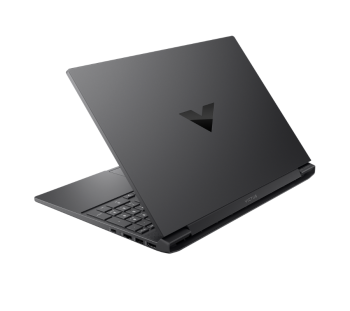
Refined Chassis: The 2025 model features a slightly slimmer profile and a more rigid hinge design, addressing the “screen wobble” issues of the past.
The “V” Branding: The minimalist “V” logo on the lid replaces the flashy LEDs of competitors, allowing the laptop to blend into professional environments.
Eco-Friendly Construction: In line with HP’s sustainability goals, the Victus 16 utilizes ocean-bound plastics and recycled metals in its construction, appealing to the environmentally conscious user at MOTOGO.
5. Thermal Management: OMEN-Inspired Cooling
To keep the new RTX 50-series GPUs running at peak performance, HP has integrated elements from the OMEN cooling stack.
Rear Exhaust Optimization: Large, wide-open rear vents ensure that hot air is pushed away from the user and the screen.
IR Thermal Sensor: The Victus 16 (2025) includes an infrared thermal sensor that monitors the surface temperature of the laptop in real-time, adjusting fan curves before the user even feels the heat.
OMEN Gaming Hub: This software allows users to “undervolt” the CPU and customize fan speeds, providing a level of control usually reserved for much more expensive machines.
6. Keyboard and Interaction: Built for Productivity
For those writing thousands of lines of code or 1500-word articles, the keyboard is paramount.
Full-Sized Layout: The Victus 16 includes a dedicated numeric keypad, a must-have for the finance and data-entry tasks common among MOTOGO clients.
1-Zone RGB: While it isn’t per-key RGB like the Alienware, the 1-zone RGB backlighting provides enough flair for gaming while remaining subtle enough for professional use.
Precision Touchpad: The enlarged touchpad supports all Windows 11 multi-touch gestures, making navigation fluid when you don’t have a mouse connected.
7. Connectivity: The Modern Professional Port Array
HP hasn’t skimped on the ports for the 2025 edition.
USB-C with Power Delivery: One of the USB-C ports now supports Power Delivery, allowing you to charge the laptop with a standard 100W PD charger—perfect for students who don’t want to carry the heavy 230W power brick to campus.
HDMI 2.1: Full support for 4K 120Hz external displays.
Wi-Fi 7 Ready: Many 2025 configurations include Wi-Fi 7 modules, ensuring the fastest possible wireless speeds for low-latency gaming and massive file downloads.
8. Comparative Analysis: Victus 16 vs. The Competition
How does the 2025 Victus stack up at MOTOGO?
Vs. Dell G16: The Dell is slightly more powerful but significantly heavier and louder. The Victus 16 offers a much better balance for someone who needs to carry their laptop daily.
Vs. Acer Nitro V 16: The Nitro has a more “gamer” aesthetic, but the Victus 16 (2025) offers a more premium-feeling chassis and a more color-accurate display.
Vs. Lenovo LOQ: The LOQ is the Victus’s biggest rival. While the LOQ has a great keyboard, the Victus 16 often wins on battery life and thermal efficiency in the RTX 5060 tier.
9. Maintenance Guide: The MOTOGO Standard
To ensure your HP Victus 16 (2025) remains a reliable companion:
Dust Maintenance: Use compressed air on the bottom intake vents every 3 months. The Victus moves a lot of air, and dust buildup is the #1 cause of performance drops.
Battery Threshold: Use the HP Power Manager to limit charging to 80% if you primarily use the laptop plugged in during your lab sessions.
Bios Updates: Regularly check the OMEN Gaming Hub for firmware updates that optimize the new RTX 50-series power delivery.
10. Conclusion: Why Buy the Victus 16 from MOTOGO?
The HP Victus 16 (2025) is the ultimate proof that you don’t need to spend $2000 to get a premium gaming and professional experience. It is a machine that grows with you—from your first networking lab assignment to your first professional software deployment. At MOTOGO, we pre-check every Victus unit for thermal stability and screen uniformity, ensuring you get the best “silicon lottery” results possible. Stop settling for less. Experience the power and value of the HP Victus 16 at MOTOGO today.
